
Sigil is the free EPUB editor I wish I’d found years earlier. I used to fix ebook formatting by converting back and forth in Calibre, crossing my fingers each time. Sigil gives you direct access to the HTML and CSS inside an EPUB, which feels intimidating at first but solves problems that converters can’t touch.
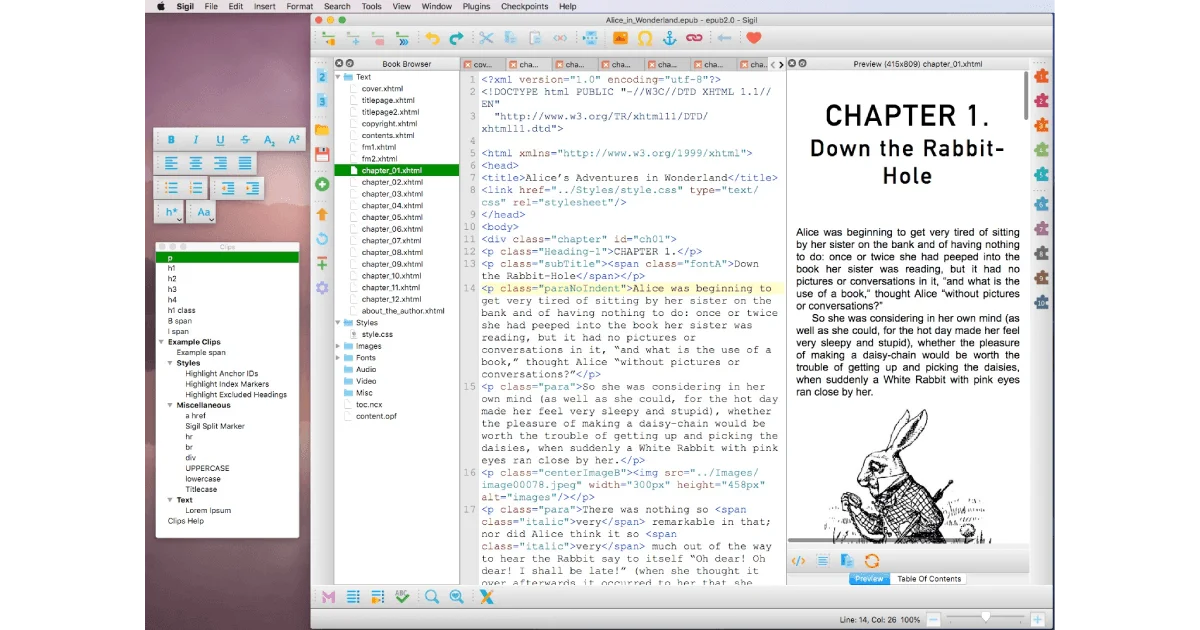
Downloading is straightforward — it’s on GitHub for Windows, macOS, and Linux. The Windows installer is an .exe, macOS gets a .dmg you drag to Applications, and Linux gets it through the package manager or an AppImage. Once launched, the interface splits into three panels: the Book Browser on the left showing every file inside the EPUB, the main editor in the center where you work with code, and a live preview on the right. Knowing that an EPUB is essentially a zipped website makes the whole thing click. For lighter WYSIWYG editing without touching code, PageEdit is a simpler companion tool that pairs well with Sigil.
macOS
brew install --cask sigilWindows
winget install Sigil-Ebook.SigilLinux
sudo apt install sigilMy typical use case is fixing poorly converted ebooks. Somebody ran a PDF through a converter and the chapter headings are size 72, paragraphs have random font changes, and the table of contents is missing. I open the EPUB in Sigil, double-click the problematic .xhtml file in the Book Browser, and edit the HTML directly. For simpler changes, Book View lets you edit in a WYSIWYG mode without touching code.
Creating an EPUB from scratch is surprisingly doable. Start a new file, add .xhtml chapter files in the Text folder, and write a stylesheet in the Styles folder. The basic CSS I use is simple — body font, line height, paragraph indentation — and Sigil generates the table of contents automatically from your heading tags. Add a cover image by right-clicking in the Images folder, and mark it as the cover.
The metadata editor (Tools → Metadata Editor) handles title, author, language, and description. The Validate EPUB tool checks for structural problems before you publish — always run it. The one thing that caught me: Sigil doesn’t save undo history across sessions, so close and reopen means you lose the undo stack. Back up work frequently and save incrementally.
Plugins extend functionality with Python scripts. The EPUB3 Fixer upgrades EPUB2 files, WordCount tallies everything, and Diet EPUB strips unnecessary whitespace. Install them through Plugins → Manage Plugins. For quick fixes I still use Calibre’s editor, but for anything involving code-level changes or building from scratch, Sigil is the tool to reach for. If you’re working with EPUB 3 features like media overlays or fixed-layout, our EPUB 3 advanced features guide covers what you can do with the new spec.