
 Inksky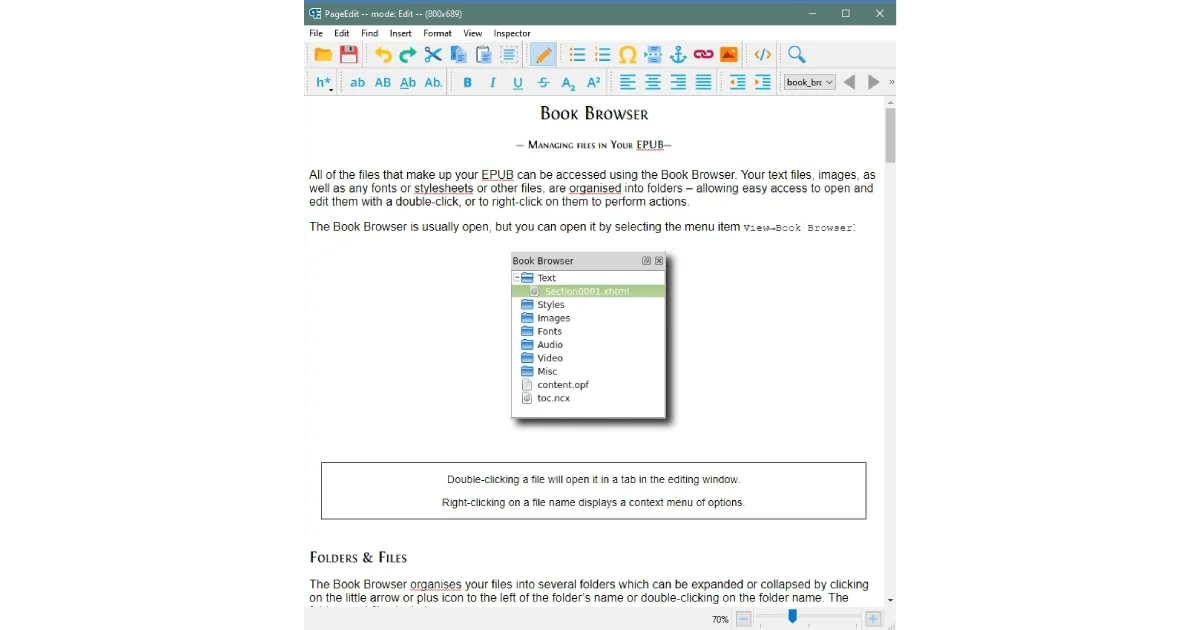
Most ePub editors feel like they were designed by people who hate you. Sigil is powerful but dense. Calibre’s editor is functional but clunky. That’s where PageEdit comes in — a lightweight, open-source ePub editor that focuses on one thing: making it easy to fix and polish your ebooks without losing your mind.
What PageEdit actually does
PageEdit is a visual ePub editor built on the same engine as Sigil. Unlike Sigil, which gives you the full code view and every possible tool, PageEdit strips things down to what most people actually need: a WYSIWYG editor for cleaning up ePub files.
It works as a companion to Sigil — you can set Sigil to use PageEdit as its external editor, giving you the best of both worlds.
Key features:
- Visual editing with live preview
- Spelling and grammar checking
- Image insertion and resizing
- Link management
- Metadata editing
- Clean HTML output
How it fits into an ebook workflow
Here’s the workflow I’ve settled on:
- Calibre for library management and initial format conversion
- Sigil for structural editing, TOC generation, and CSS tweaks
- PageEdit for the final visual polish — fixing widowed headings, adjusting image placement, and catching typos that survived earlier passes
This three-tool approach means each program handles what it’s best at. Calibre manages the library. Sigil handles the bones. PageEdit handles the skin.
Why PageEdit over Calibre’s built-in editor
Calibre’s editor is fine for quick fixes. But PageEdit has a few advantages that matter when you’re doing serious editing:
Better visual preview. PageEdit renders the page more faithfully, especially for books that use custom CSS. Calibre’s preview can sometimes differ from how the book looks on an actual e-reader.
Faster for text editing. If you’re working through a 400-page book fixing formatting, the speed difference between PageEdit and Calibre’s editor adds up.
Cleaner output. PageEdit tends to produce cleaner HTML, which means fewer validation errors when you check your ePub.
Getting started
PageEdit is free and open-source. Download it from the official GitHub releases page. It runs on Windows, macOS, and Linux.
Once installed, you can either open ePub files directly in PageEdit, or configure Sigil to launch PageEdit as its external editor under Edit → Preferences → General Settings.
Start with a file you’ve already converted in Calibre. Open it, flip through the pages, and look for the common issues: inconsistent spacing, images that don’t resize properly, or chapter headings that got mangled during conversion. PageEdit makes fixing these things straightforward — select the text, apply the formatting, save, done.
PageEdit won’t replace Sigil or Calibre. But as part of a toolkit, it fills a gap that makes the whole process smoother. If you’re serious about making your ebooks look professional, it’s worth the 10 minutes it takes to set up.