
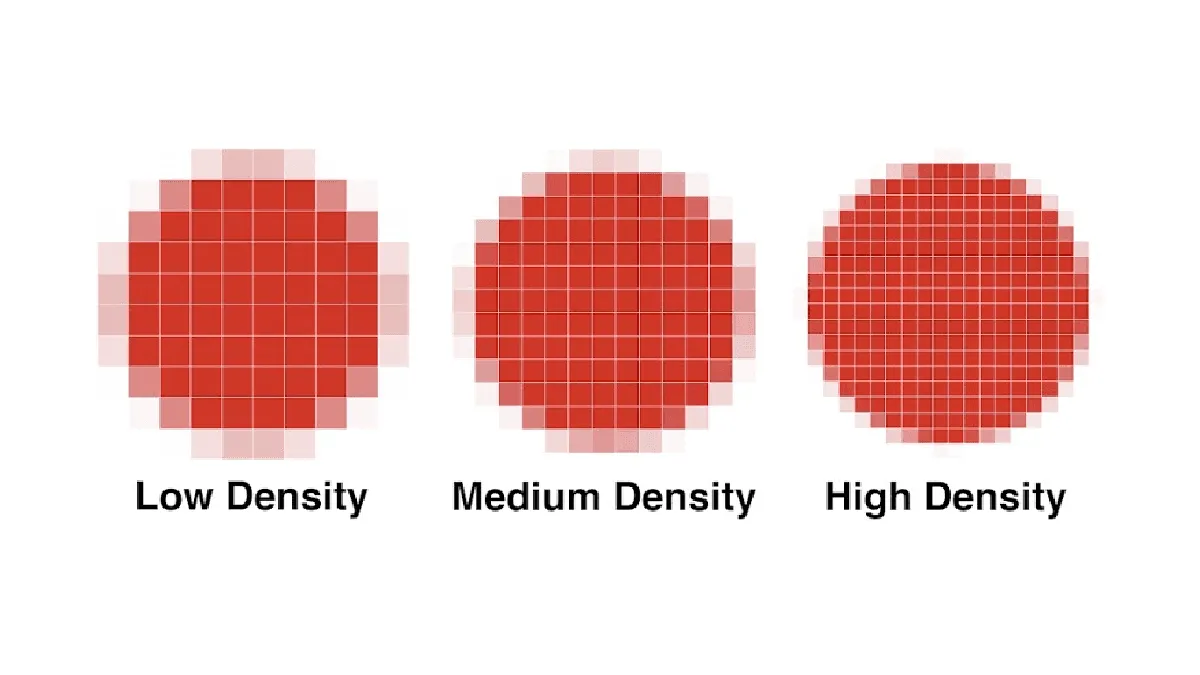
This glossary covers the core concepts behind e-reader technology — from how E Ink actually works to what PPI means for reading experience.
E Ink: How Electronic Paper Works
E Ink is the display technology behind virtually every dedicated e-reader. It’s fundamentally different from the LCD on your phone.
An E Ink display contains millions of microcapsules — tiny spheres suspended in clear fluid, sandwiched between electrode layers. Each capsule holds positively charged white particles (titanium dioxide) and negatively charged black particles (carbon black). When an electric field is applied, white particles rise or black particles rise — creating white or black pixels.
The key difference from LCD/OLED: Once particles move, they stay put with zero power. An E Ink screen uses electricity only when changing the image. This is why e-readers get weeks of battery on a single charge.
E Ink reflects ambient light like paper: no blue light emission, readable in direct sunlight, no screen flicker.
E Ink Generations
| Generation | Year | Key Improvement |
|---|---|---|
| Vizplex | 2007 | First commercial E Ink. First Kindle. |
| Pearl | 2010 | Better contrast. Kindle 3, Kobo Touch. |
| Carta | 2013 | 300 ppi resolution. Still the B&W standard. |
| Carta 1200 | 2021 | 20% faster refresh, 15% better contrast. |
| Carta 1300 | 2024 | Incremental improvement. Kindle Basic 2024, Kobo Clara BW. |
| Kaleido 3 | 2022 | Color via RGB filter over Carta. 300 ppi B&W / 150 ppi color. |
| Gallery 3 | 2023 | CMYK particle color. Full 300 ppi. 1.5 sec refresh. reMarkable Paper Pro. |
| Gallery 4 | Announced 2026 | 0.4 sec color refresh. Full 300 ppi. Expected 2027. |
PPI: Pixels Per Inch
PPI measures screen sharpness — how many pixels fit into one inch of display.
| PPI | Example | Quality |
|---|---|---|
| 167 | Kindle Touch (2011) | Noticeably pixelated |
| 212 | PocketBook Verse | Acceptable, slight fuzz on small fonts |
| 227 | Kobo Elipsa 2E, reMarkable 2 | Good at 10” (held farther away) |
| 300 | Kindle Paperwhite, Kobo Clara | Gold standard — laser-print sharp |
| 300/150 | Color E Ink (Kaleido 3) | 300 B&W, 150 color. Color looks softer |
At 300 ppi, text looks identical to a printed paperback. Viewing distance matters: a 10.3-inch 227 ppi screen looks sharp because you hold it farther away. But if you zoom into manga panels, lower PPI becomes obvious with jagged edges.
Color on Kaleido 3 uses a filter array that gives 150 ppi. Color speech bubbles in comics can look slightly fuzzy — acceptable for casual reading, but test before buying if you primarily read color comics.
Higher PPI has negligible battery impact. The page-turn speed difference between 167 and 300 ppi Carta panels comes from newer controller hardware, not PPI itself.
Refresh Rate
Refresh rate is how quickly the screen updates. E Ink is much slower than phones — and it doesn’t need to be fast for reading.
- Full refresh: Entire screen flashes, then displays new image. ~350 ms (Carta). No ghosting.
- Partial refresh: Only changed pixels update. ~150 ms. Faster but can leave ghost artifacts.
| Display | Full Refresh | Partial Refresh |
|---|---|---|
| Carta 1200/1300 | ~350 ms | ~150 ms |
| Kaleido 3 | ~400 ms | ~200 ms |
| Gallery 3 | ~1.5 sec | ~500 ms |
| LCD phone | ~8 ms | ~8 ms |
For reading books, refresh rate is irrelevant — you won’t notice 350 vs 400 ms. It matters for comics on color E Ink: Gallery 3’s 1.5-second refresh means a noticeable pause on every page of a graphic novel.
Optimization tips: Most readers let you choose between speed and quality. Set a device to full refresh every 5-10 pages — ghosting is barely noticeable and pages turn faster. Boox has “Speed” vs “Regal” modes; Kindle/Kobo let you pick refresh frequency.
Front Light Temperature
Front light temperature is the color of the LEDs in an e-reader’s screen.
- Cool light (white/blue): Better for daytime. Higher contrast, feels brighter.
- Warm light (amber/orange): Better for evening. Reduces blue light, helps melatonin production for sleep.
Which Devices Have Warm Light
- Kindle Paperwhite, Oasis, Scribe, Colorsoft: Adjustable warm light
- Kindle Basic (2024): White only — no warm option
- All Kobo models with ComfortLight PRO: Adjustable warm
- Most Boox: Dual-tone warm/cold
- PocketBook SMARTlight models: Adjustable
- reMarkable 2: No front light at all
- reMarkable Paper Pro: Adjustable reading light
Getting the Right Setting
- Daytime: Cool, bright (10-14 on brightness scale)
- Evening: Shift to warm. Both Kindle and Kobo offer automatic scheduling.
- Night: Max warmth, brightness at 2-5. Candlelight glow that won’t disturb a partner.
Common misconceptions: Dark mode (white text on black) does not replace warm light — the light color behind the black background still matters. Not all Kindles have warm light (Kindle Basic does not). Auto-brightness sensors adjust brightness, not warmth — set warmth separately.
Sideloading
Sideloading means transferring ebook files to an e-reader without using the built-in store — via USB, email, or cloud.
Why Sideload
- Buy from stores other than Amazon/Kobo (Smashwords, Humble Bundle, direct from publishers)
- Read free public domain books (Project Gutenberg, Standard Ebooks)
- Read personal documents, work PDFs, academic papers
- Keep DRM-free backups of your purchases
How to Sideload by Brand
- Kindle: “Send to Kindle” (web/email/app) auto-converts EPUB. USB to
documentsfolder. Kindle does NOT accept EPUB via USB — convert to AZW3 or use Send to Kindle. - Kobo: USB to root folder. EPUB/KEPUB/PDF. Calibre with Kobo Utilities plugin for metadata sync.
- Boox: USB, Dropbox, Google Drive, or install apps from Google Play. Supports virtually any format.
- PocketBook: USB, microSD, built-in Dropbox, email-to-device. 20+ format support.
- reMarkable: USB or desktop/mobile app. PDF and EPUB only.
Sideloading Pitfalls
- Kindle covers not showing: Use Calibre’s “Polish” tool to embed covers before sending. Briefly toggle Airplane Mode after sideloading to trigger cover fetch.
- Kobo database corruption: Badly formatted EPUBs can corrupt Kobo’s SQLite database. Always validate with EPUBCheck or Calibre’s “Check Book” tool first.
- Series metadata: Kindle ignores series info from sideloaded files. Kobo needs KEPUB format (use Kepubify or Kobo Utilities plugin) for series data.
Calibre handles device detection, auto-conversion, and metadata sync for all brands. For a full walkthrough, see the beginner’s guide to Calibre. For brand-by-brand sideloading steps, see our sideloading guide.
Key Takeaway: The Five Specs That Actually Matter
For choosing an e-reader, ignore the marketing specs. Focus on these five:
- PPI: 300 for sharp text. 227 acceptable on 10” devices.
- Warm light: Essential if you read before bed.
- Refresh rate: Irrelevant for text. Matters for color comics.
- Sideloading support: Determine whether books will actually work.
- Display generation: Carta 1300 is the current B&W standard. Gallery 4 will be the next big leap for color.